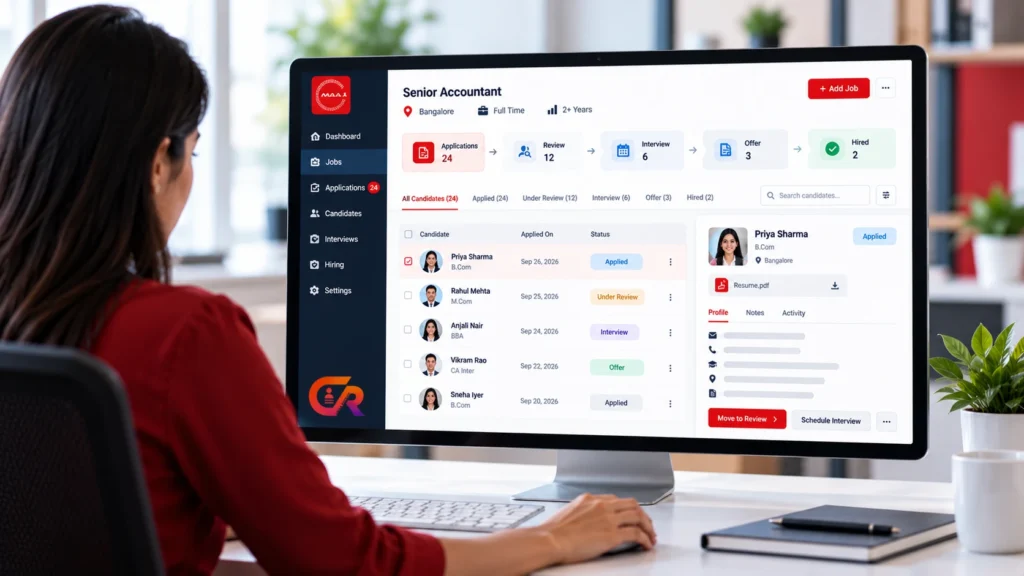
An applicant tracking system is software that helps a business manage job applications, and it is often the point where informal hiring starts to feel organised. Hiring usually begins simply: a job is posted, applications arrive by email, and a spreadsheet records who has been contacted. That can work for a while. Then more roles open, more people get involved, and it becomes harder to say where each candidate stands.
This guide explains what an ATS is, how it works, what it can and cannot do, and how to decide whether your business needs one.
Quick Answer
An applicant tracking system (ATS) collects job applications, stores candidate records and tracks each candidate through the hiring process. Whether you need one depends on how many roles you hire for, how many people are involved and how much administrative work your current process creates.
What Is an Applicant Tracking System?
An applicant tracking system is software that helps an organisation receive, organise and track job applications from the moment a candidate applies until a hiring decision is made. Instead of scattering applications across inboxes and files, it keeps them in one structured place.
It helps to separate an ATS from three things it is often confused with:
- A job board is a place to advertise vacancies and reach candidates. Its main purpose is distribution and discovery, not managing what happens after someone applies.
- A careers page is the section of your own website that lists open roles and describes working for you. Candidates look there, but a page on its own does not track anyone.
- A general HR system usually focuses on people who already work for you, such as employee records, leave and payroll. An ATS focuses on people who are not yet employees.
Capabilities differ between products. Some systems cover the whole process from job posting to hiring decision, while others handle only part of it. Treat ATS as a category, not a fixed feature list. For a shorter introduction written for small employers, see our guide to what a recruitment ATS is.
What Does an Applicant Tracking System Do?
The exact feature set depends on the product, but most ATS software supports some combination of the following:
- Job publishing. Creating job posts and making them available on a careers page or other channels.
- Application collection. Receiving applications through a form, often with a resume or CV upload.
- Candidate records. Storing each applicant’s details and documents in one place.
- Application status tracking. Recording where each application stands, such as new, under review or interviewed.
- Candidate review. Letting recruiters and hiring managers look through applications and record decisions.
- Recruitment workflow. Moving candidates through defined hiring stages.
- Communication and interview coordination. Sending confirmations or messages and arranging interviews, where the product supports it.
- Recruitment reporting. Showing basic figures such as applications per role, where the product supports it.
No single system is guaranteed to include everything above. Some include only a few of these functions, so check the specific features of any product instead of relying on the label.
How Does an ATS Work?
A typical applicant tracking process follows the same path as hiring itself. The system gives each step a place to happen and keeps a record of what was done.
Job created
→
Job published
→
Candidate applies
→
Application reviewed
→
Candidate progresses
→
Interview
→
Hiring decision
A recruiter or business owner creates the job and publishes it. A candidate applies, usually through a form on a careers page or job listing. The application is stored as a record that the hiring team can review. Candidates who fit are moved forward, interviews are arranged, and the final decision is recorded.
The value of an applicant tracking system is mostly in the structure. Everyone looks at the same record, and the status of each candidate is written down rather than remembered. How much of this the software automates depends on the product, and most of the judgement still comes from people.
What Problems Does an ATS Solve?
An ATS is usually adopted to reduce the friction that builds up in informal hiring. Common problems include:
- Email overload. Applications mixed in with everything else in a shared inbox.
- Spreadsheet fragmentation. Several people keeping separate lists that drift out of date.
- Missing applications. Messages that are overlooked, filtered as spam or never forwarded.
- Inconsistent statuses. Different people using different labels for the same stage.
- Duplicated administration. The same details copied between emails, files and calendars.
- Limited visibility. No quick way to see how many candidates are at each stage.
An ATS can reduce these problems, but it does not remove them automatically, and it should not be expected to deliver guaranteed time or cost savings. Results depend on how consistently the team uses it.
What Are the Benefits of an ATS for Small Businesses?
For a small business, the practical benefits are usually about order rather than scale. An applicant tracking system for small business hiring tends to help in these areas:
- Centralised records. Applications and documents live in one place.
- Visibility. You can see who has applied and where each person stands.
- Repeatable process. The same steps apply to every role, which makes hiring easier to hand over.
- Candidate experience. A clear application route and a confirmation message let candidates know their application arrived.
- Collaboration. Several people can review candidates without forwarding files.
These benefits depend on implementation and adoption. An applicant tracking system that is badly configured or used inconsistently will not improve a process, and a simple process can be managed well without one.
Does Every Business Need an ATS?
No. An applicant tracking system is a tool, and not every hiring process needs one. A business that hires once or twice a year, receives a handful of applications and has one person making the decision may manage perfectly well with a clear email process and a simple tracking sheet. Adding software in that situation can create more work than it saves.
An ATS becomes more useful as complexity grows. Signs that you may be reaching that point include:
- You hire for several roles at the same time, or repeatedly through the year.
- Applications arrive faster than you can reliably track by hand.
- More than one person reviews candidates or makes hiring decisions.
- You have lost or overlooked an application before.
- You need a record of who applied, when, and what happened next.
- Handling candidate data safely is a concern.
If none of these apply, a lighter process may be enough for now. You can revisit the decision when your hiring needs change.
ATS vs Job Board vs Recruitment Plugin
These three terms overlap, which is where much of the confusion comes from. The table summarises what each is mainly for. Products often cross these lines, so treat it as a guide to purpose and not a strict rule.
| Aspect | ATS | Job board | Recruitment plugin |
|---|---|---|---|
| Primary purpose | Manage applications and candidates | Advertise vacancies to candidates | Add recruitment functions to a WordPress site |
| Where it runs | Hosted service or installed software | Third-party site or job board plugin | Inside your own WordPress site |
| Job publishing | Often included | Core function | Typically included |
| Application handling | Core function | Varies, and may link out | Often included |
| Candidate tracking | Core function | Usually limited | Depends on the plugin |
| Best suited to | Structured hiring processes | Reaching new candidates | Companies hiring through their own website |
In practice, a recruitment plugin can cover part of what an ATS does, and some job boards add application handling. For a detailed look at where the categories differ and overlap, read WordPress job board vs recruitment plugin: what is the difference.
What Should You Look for in an ATS?
Features matter less than fit. Useful questions to ask before choosing applicant tracking software:
- Ease of use. Will the people who do the hiring find it quick to learn?
- Application handling. How do candidates apply, and what do they receive afterwards?
- Status tracking. Can you define stages that match how you really hire?
- Privacy and security. How are resumes and personal data stored, who can see them, and how can records be removed?
- Integrations. Does it work with your website, email and calendar tools?
- Reporting. Can you see the figures you will actually use?
- Scalability. Will it still suit you if hiring volume or team size grows?
- Total cost. Consider licence fees, setup, support and the time needed to maintain it, not just the headline price.
A shortlist of two or three products, each tested against a real hiring scenario, usually tells you more than a long feature comparison.
Can a Small Business Use WordPress as Part of Its ATS?
If your company already has a WordPress website, it can play a useful part in recruitment. A careers page built in WordPress can present your roles and employer information, as covered in our guide to building a professional careers page in WordPress. Our article on getting job applications on your website with WordPress explains how applications can reach you directly.
On its own, WordPress is a content platform, not an applicant tracking system. Handling applications and candidate records typically needs a recruitment plugin, and plugins differ widely in what they offer. A WordPress-based setup suits some small businesses well and others not at all. You can see how this works in practice in CMAA Recruit: a WordPress ATS for jobs, applications and hiring.
Where CMAA Recruit Fits
CMAA Recruit is a WordPress recruitment plugin built for a single company’s own careers site. It is not automatically equivalent to every enterprise ATS. It is designed for businesses that want to run hiring through their WordPress website.
The Free version includes job listings with an Advanced Job Builder, a public application form with resume upload, an applications list for recruiters, a login-free candidate status page and a confirmation email to candidates. CMAA Recruit Pro adds features such as a Kanban pipeline, a candidates database, interview scheduling and analytics. Review the details on the product page before deciding which version suits your hiring process.
See how recruitment can be managed through WordPress
Try the live demo to see job publishing, applications and candidate review working together in WordPress.
Frequently Asked Questions
What does ATS stand for in recruitment?
ATS stands for applicant tracking system. It is software that helps manage job applications and candidates through the hiring process.
Is an ATS the same as a job board?
No. A job board mainly advertises vacancies and helps candidates find them. An ATS manages applications and candidates once they apply. Some products combine both functions, so check what a specific product actually does.
Can a small business use an ATS?
Yes. Many ATS products are used by small teams. Whether one is worthwhile depends on your hiring volume and how complicated your process has become, as described above.
Does an ATS automatically select the best candidate?
No. An ATS organises information, and some products offer features such as screening questions or scoring that can help a recruiter prioritise. A person still reviews candidates and makes the hiring decision, and any automated filtering should be checked for accuracy and fairness.
Is an ATS worth paying for?
It can be, when it saves enough time, prevents enough missed applications or improves record keeping enough to justify the cost. For a very small, occasional hiring process, a simple or free option may be enough. Test any product against your own situation instead of assuming.
Can WordPress be used for applicant tracking?
In part. WordPress can host a careers page and, with a suitable recruitment plugin, collect applications and manage candidate records. Capabilities depend on the plugin, so check them before relying on it.
Final Takeaway
An applicant tracking system helps a business keep applications, candidates and hiring decisions organised in one place. It tends to be most useful when you hire regularly, involve several people or find that email and spreadsheets are starting to lose track of candidates. For occasional, simple hiring, it may not be necessary yet.
Before choosing hiring software for small businesses, be clear about how you hire, which features you will actually use, how candidate data will be protected and what the full cost will be. A well-fitted tool that your team uses consistently is usually worth more than a large one it avoids.
Compare recruitment features before choosing your solution
See the full Free and Pro feature breakdown for CMAA Recruit.

About CMAA Softwares
CMAA Softwares builds practical software for SMEs and professional firms, grown out of problems solved first inside CMAA Advisors' own payroll, compliance, and recruitment desks. CMAA Recruit is our recruitment ATS plugin for WordPress. Learn more about us.