
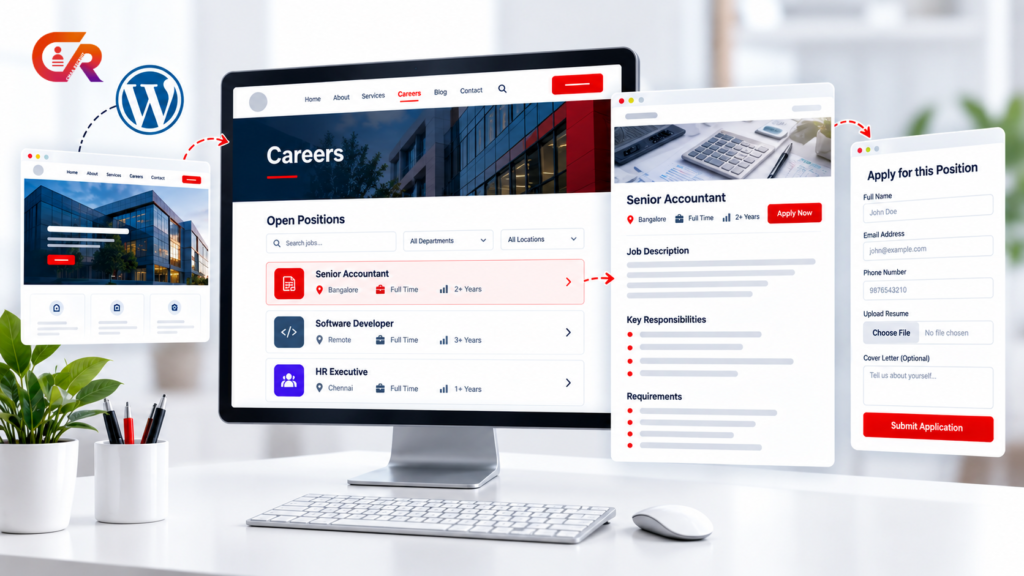
Many businesses already have a website, but their careers process is still fragmented.
- Jobs are posted manually.
- Candidates email resumes.
- Job information is scattered.
- Applications arrive in different places.
- Recruiters maintain spreadsheets.
- Candidates have no clear place to find current openings.
A professional WordPress careers page should bring the job discovery and application experience together on the company’s own website, instead of scattering it across inboxes and spreadsheets.
WordPress can handle the page itself, while a recruitment plugin can add structured job listings and application management on top of it. This guide walks through building that careers page step by step.
What a Professional WordPress Careers Page Should Include
Before building the page, it helps to know what a complete careers experience actually needs:
- A clear careers page introduction
- Current job openings
- Search or filtering where appropriate
- Individual job descriptions
- Job location and employment type
- Responsibilities and qualifications
- Compensation, where the employer chooses to disclose it
- A clear application method
- Resume or document upload, where appropriate
- Privacy and consent information
- A mobile-friendly experience
- An easy way for candidates to navigate back to available jobs
It also helps to separate three related but distinct ideas. The careers page is the destination where candidates discover opportunities. The job page is the individual page describing one position. The application process is the mechanism through which candidates actually apply. Keeping these distinct matters for both SEO and usability.
A careers page that skips one of these pieces tends to lose candidates at exactly that gap. A page with no individual job details forces candidates to guess. An application process with no clear next step leads to abandoned applications. Treating all three as connected parts of one experience, rather than separate afterthoughts, is what makes a careers page feel professional.
Plan Your Careers Page Structure
A simple structure works well for most businesses: Home, then Careers, then a job listing, then an individual job, then the application itself.
WordPress Pages are well suited to this. The WordPress documentation on creating pages confirms that Pages are intended for non-chronological content and can be organized hierarchically, which fits a careers section with a main page and individual job pages underneath it.
Create the Careers Page in WordPress
With the structure planned, the basic page itself is straightforward to set up:
- Create a new WordPress Page.
- Give it a clear title, such as “Careers” or “Careers at [Company].”
- Add a short introduction.
- Explain what candidates can expect.
- Add the job listing area.
- Publish the page.
- Add the careers page to the site’s navigation.
This establishes the basic page. The next sections cover adding actual recruitment functionality on top of it.
See how a WordPress ATS can power your careers page
Businesses that want more than a static careers page can use a recruitment ATS to connect job listings, applications, and candidate management within WordPress.
Add Your Job Listings
A careers page becomes substantially more useful once candidates can see current openings directly on the site, rather than being told to “check back” or email for a list.
Each listing entry should give candidates enough to decide whether to look further:
- Job title
- Department
- Location
- Employment type
- Experience requirements
- Salary or compensation, where applicable
- A short summary
- A link to the complete job description
- An application option
Each job should have its own dedicated page rather than being folded into one long careers page. A single giant page becomes difficult to scan, harder to share for a specific role, and makes it harder to keep job-specific details accurate as positions open and close.
It also helps to keep the listing itself current. A list that shows the same three roles for months, or still shows a position that was filled weeks ago, signals to candidates that the page is not actively maintained, which can discourage applications for the roles that are still genuinely open.
Create Detailed Job Descriptions
An effective job page gives candidates a complete picture of the role, not just a title and an apply button.
Job Overview
Start with the basics: title, department, location, employment type, and experience level.
Responsibilities
Use specific responsibilities rather than generic corporate language, so candidates can genuinely judge whether the role matches their experience.
Qualifications and Skills
Where appropriate, separate essential requirements from desirable qualifications, so candidates are not discouraged from applying by a list that mixes must-haves with nice-to-haves.
Compensation and Benefits
Transparency here, to the extent the business is comfortable with it, can help candidates understand whether the opportunity fits them before they invest time applying.
How to Apply
Give candidates a clear next step. This is also where the page’s structured job data matters: Google’s JobPosting structured data documentation states that this markup should be placed on a page dedicated to a single job posting, not on a job-listing page containing multiple jobs.
Add an Application Process
Once a candidate clicks Apply, the process behind that click matters as much as the job description itself. A solid application process generally covers:
- An application form
- Name and contact information
- Resume or CV upload
- Relevant screening questions
- Privacy and consent
- Confirmation after submission
- Duplicate submission handling
- Secure handling of candidate information
Include appropriate privacy and consent information for the candidate data your business collects, matched to what actually applies to your business and location.
A confirmation step matters more than it might seem. Candidates who submit an application and see nothing afterward are often left wondering whether it actually went through, which can lead to duplicate submissions or candidates giving up on the process entirely.
Manage Applications From Your WordPress Dashboard
A simple careers page and a careers page backed by a recruitment ATS behave very differently once applications start arriving.
Without an ATS, the path usually looks like this: job listing, then email or a generic form, then a spreadsheet, then manual tracking. Someone has to copy each application into a shared sheet, chase down resumes scattered across an inbox, and manually remember which candidate is at which stage.
With an ATS, it looks more like this: job listing, then application, then an application record, then candidate management, then a recruitment workflow. Each application is captured in one place automatically, and recruiters work from that same record as the candidate moves through the process, rather than rebuilding the picture from scratch in a spreadsheet.
An ATS can centralize applications inside the WordPress administration area instead of forcing recruiters to reconstruct the hiring pipeline from email threads and spreadsheets. For a closer look at how a WordPress ATS can connect jobs, applications, and hiring workflows, see our guide to CMAA Recruit. And if you are still deciding whether your business needs an ATS at all, see our guide to what a recruitment ATS actually does.
Optimize Your WordPress Careers Page for Search
These practices are about making the careers page easier to find and understand, not a promise of any particular ranking.
Use Descriptive Page and Job Titles
Avoid vague titles such as “We’re Hiring.” A title like “Senior Accountant in Bangalore” tells both candidates and search engines what the page is actually about.
Give Each Job Its Own URL
An individual job page with its own URL can hold the actual job information, and can be shared, bookmarked, or linked to directly.
Use Complete Job Descriptions
A page containing only a title and an Apply Now button gives candidates and search engines very little to work with. Use the full structure covered earlier: overview, responsibilities, qualifications, and how to apply.
Keep Structured Data Aligned With Visible Content
Structured data should accurately represent what candidates can actually see on the page. Review Google’s official JobPosting structured data documentation for the current technical requirements before relying on it.
Keep Closed Jobs Under Control
Update or remove job listings that are no longer open. Leaving closed positions visible confuses candidates and can misrepresent what is actually available.
Make Your Careers Page Mobile Friendly
A large share of candidates will discover and apply to jobs from a phone, so the experience needs to hold up there. That means:
- Readable text
- Easy scrolling
- Large enough buttons
- An application form that is usable on a small screen
- Resume upload that works reliably on mobile
- No horizontal scrolling
- Job information that is easy to scan
- Avoiding overly complex layouts
The key point is simple: a candidate should be able to discover a job and start an application comfortably from a phone, without zooming in to read a job description or fighting with a form that was clearly designed for a desktop screen.
Common Careers Page Mistakes to Avoid
- Treating the careers page as a static announcement instead of a living page.
- Putting every job into one enormous page.
- Using incomplete job descriptions.
- Making candidates email resumes manually.
- Hiding the application process.
- Forgetting mobile users.
- Leaving closed positions visible.
- Collecting candidate information without appropriate privacy information.
- Adding job structured data to the wrong page. JobPosting markup belongs on individual job posting pages, not on general job-listing pages.
Ready to connect your careers page with recruitment management?
CMAA Recruit adds job publishing, applications, and candidate management directly to WordPress.
Frequently Asked Questions
Can I create a careers page with WordPress?
Yes. WordPress Pages can be used for permanent site content, while plugins can extend the page with recruitment functionality such as job listings and applications.
Do I need a WordPress careers page plugin?
A basic careers page does not necessarily require a plugin. Structured job listings, applications, and candidate management generally do require additional functionality.
Should each job have its own page?
Yes. Individual job pages are useful for usability, for sharing a specific role, and for job-specific structured data that describes one posting at a time.
Can WordPress collect job applications?
Yes, with an appropriate form or recruitment plugin. Businesses should consider how resumes and candidate information are handled and stored securely.
Can a WordPress careers page appear in Google Jobs?
Eligible individual job pages can use Google’s JobPosting structured data, but structured data does not guarantee appearance. It must follow Google’s technical requirements and content policies.
Can I manage candidates inside WordPress?
This depends on the recruitment functionality installed. An ATS plugin can centralize applications and candidate management directly within WordPress.
Final Takeaway
A professional careers page is more than a list of vacancies. It should give candidates a clear path from discovering an opportunity to submitting an application, while giving the employer a manageable process behind the scenes.
WordPress can provide the website foundation, while an ATS such as CMAA Recruit can connect jobs, applications, and recruitment management within that same website.

About CMAA Softwares
CMAA Softwares builds practical software for SMEs and professional firms, grown out of problems solved first inside CMAA Advisors' own payroll, compliance, and recruitment desks. CMAA Recruit is our recruitment ATS plugin for WordPress. Learn more about us.