A business looking for recruitment software on WordPress usually runs into two overlapping categories: job board plugins and recruitment plugins. The names get used loosely, and product pages do not always make the distinction clear.
This guide explains what each category typically does, where they overlap, and how to work out which one actually matches your hiring requirements.
What Is a WordPress Job Board?
A WordPress job board plugin is generally built around publishing and displaying job vacancies. At its core, it lets a business list open positions, show job details, and give visitors a way to browse what is available.
Typical job board functionality includes:
- Publishing job vacancies
- Displaying open positions in a list or grid
- Job search and filtering, where the plugin supports it
- Individual job pages for each vacancy
- Categories or job types for organizing listings
- Public facing recruitment content that helps candidates discover roles
A company can use a job board plugin as the public facing part of its careers website, even if applications are ultimately handled somewhere else, such as a separate careers platform or a generic email address.
This works well for businesses that simply want an up to date, searchable list of openings on their own site, and are comfortable handling everything after that point through whatever process they already use.
What Is a WordPress Recruitment Plugin?
A WordPress recruitment plugin generally extends beyond publishing jobs into the process that happens once a candidate is interested. It typically aims to keep job publishing and application handling inside the same WordPress installation.
Depending on the plugin, this can include:
- Job publishing
- Application collection through a frontend form
- Candidate or application records
- Application management from the WordPress dashboard
- Candidate status tracking
- A structured recruitment workflow
- General hiring administration
It is worth being clear here: capabilities vary significantly between recruitment plugins. Some cover most of this list, others focus on a narrower slice of it, and calling something a recruitment plugin does not automatically mean it does everything above.
WordPress Job Board vs Recruitment Plugin: The Main Difference
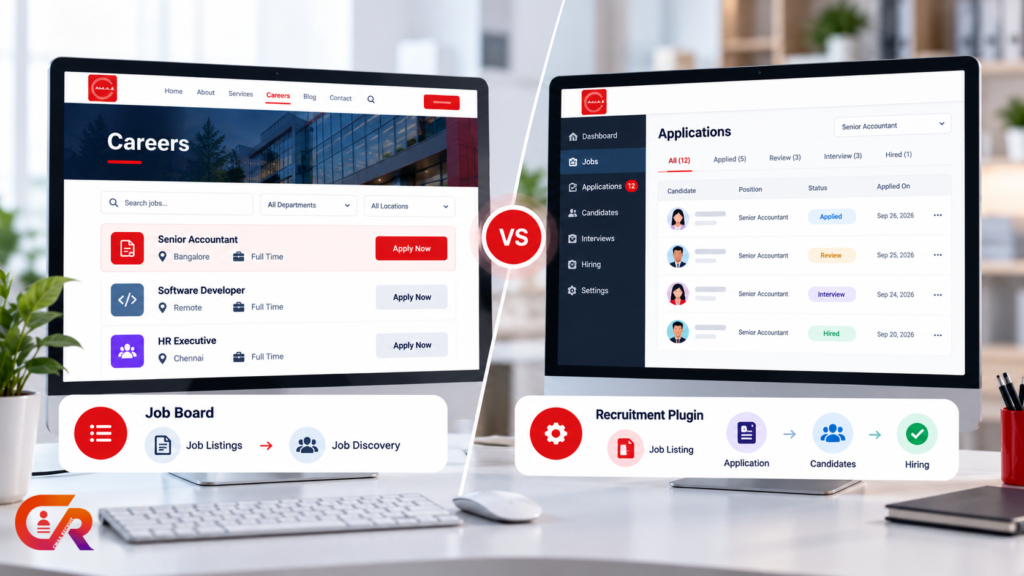
The central distinction is usually this: a job board primarily helps a company publish and display job opportunities, while a recruitment plugin can extend the website beyond job publishing into collecting and managing applications and supporting the hiring process.
That said, this is not a strict rule. Some job board plugins support applications. Some recruitment plugins include job board style publishing. Some recruitment plugins only offer a handful of recruitment management capabilities rather than the full list. The table below summarizes what is typical, not what is universal.
| Capability | WordPress Job Board | Recruitment Plugin |
|---|---|---|
| Job publishing | Typically included | Typically included |
| Careers page | Often included | Often included |
| Job detail pages | Typically included | Typically included |
| Application collection | Depends on the plugin | Typically included |
| Resume or document collection | Often not included | Typically included |
| Candidate records | Rarely included | Often included |
| Application status | Rarely included | Often included |
| Recruitment workflow | Not typically included | May include |
| Candidate tracking | Not typically included | May include |
| Hiring management | Not typically included | May include |
Job publishing sits at the top of the table because it is where the two categories overlap the most. Candidate tracking and hiring management sit near the bottom because that is where a plain job board generally stops and where recruitment plugin capability, when present, tends to matter most.
Job Publishing: Where Both Solutions Overlap
Both categories can usually publish jobs. Job listings, individual job pages, structured job information, and a careers page are common ground rather than a dividing line.
What differs is depth and integration. A dedicated job board plugin may offer more publishing specific features, such as richer filtering or job types, while a recruitment plugin’s publishing side exists mainly to feed candidates into the application process that follows. If you are building this part of your site from scratch, our guide to building a professional careers page in WordPress covers the careers page and job listing side in more detail.
Applications: Where the Difference Becomes More Important
Simply displaying a vacancy is different from actually receiving an application for it. This is where job boards and recruitment plugins tend to diverge more clearly.
A recruitment plugin typically provides an application form, resume upload, an application record once the form is submitted, a confirmation for the candidate, and a place for that application data to live. A job board plugin may or may not offer any of this, depending on the specific product. For a closer look at what a working application process actually requires, see our guide to getting job applications on your website with WordPress.
Candidate Management and Application Tracking
Once an application arrives, someone has to review it, keep track of candidate information, and move the candidate through whatever stages the hiring process involves.
Recruitment plugins that go beyond basic form collection often add candidate records, application status, and a way to keep this information organized in one place rather than scattered across email and spreadsheets. Not every recruitment plugin provides every part of this. Some stop at collecting the application and leave status tracking and organization to the business.
This is usually the point where the practical difference between a job board and a recruitment plugin becomes obvious in daily use, rather than in a feature list. A team reviewing ten applications a week feels this difference quickly.
Recruitment Workflow: Job Board vs Recruitment Plugin
A simple way to see the difference is to lay out the hiring process as a sequence: job created, then published, then a candidate applies, then the application is reviewed, then the candidate progresses, then an interview happens, then a hiring decision is made.
A basic job board generally covers the first two steps, job creation and publishing, and stops there. Everything from the application onward, reviewing, progressing candidates, and tracking the process through to a decision, generally requires recruitment management functionality rather than publishing functionality alone.
Which One Does Your Business Need?
There is no single universal answer here. It depends on how much of the hiring process you want to run through your website.
A job board may be sufficient when the main requirement is publishing vacancies, applications are handled elsewhere, application volume is low, or recruiters already use a separate system for managing candidates.
A recruitment plugin tends to be more relevant when applications need to be collected on the company website itself, recruiters need a central application record, hiring teams need to track application status, the business wants to reduce email or spreadsheet based recruitment, or recruitment activity needs to stay connected to the rest of the website.
Can a WordPress Recruitment Plugin Also Work as a Job Board?
Yes, and this is where the two categories genuinely overlap rather than compete. A recruitment plugin may provide public job listings, a careers page, individual job detail pages, an application form, and application management, all inside one product.
The distinction is really about depth of recruitment functionality, not simply whether jobs are displayed publicly. A product can publish jobs perfectly well and still be a job board rather than a recruitment plugin, if it stops there. The more useful question when evaluating a specific plugin is not which category it falls into, but exactly how far its recruitment functionality actually goes.
WordPress Job Board vs ATS: Are They the Same?
Job board, recruitment plugin, and ATS get used somewhat interchangeably, but they are not identical. An applicant tracking system is generally focused on tracking and managing applicants through the hiring process, while a job board is primarily focused on publishing and helping candidates discover jobs. If you are still working out what an ATS actually covers, see our guide to what a recruitment ATS actually does.
A recruitment plugin sits between the two, and the amount of ATS style functionality it provides varies by product. Not every WordPress recruitment plugin is equivalent to a full enterprise ATS, and treating the terms as interchangeable can lead to the wrong expectations when evaluating software.
Where CMAA Recruit Fits
CMAA Recruit is a WordPress recruitment plugin designed to combine public job publishing and application management within a company’s own WordPress website, rather than treating them as separate tools.
The current Free version includes job listings, careers and job detail pages, a frontend application form, application records, application status management, a login free candidate status portal, and resume or document uploads. This runs as a recruitment oriented workflow inside the standard WordPress dashboard rather than a separate system. For a closer look at the product itself, see our guide to CMAA Recruit as a WordPress ATS.
See how a WordPress recruitment plugin can handle applications
Try the live demo and see job publishing and application management working together in WordPress.
Questions to Ask Before Choosing a WordPress Recruitment Solution
A short checklist can help clarify which category actually fits your situation:
- Do we only need to publish jobs?
- Where will applications be collected?
- Do candidates need to upload resumes?
- Who will review applications?
- Do we need application statuses?
- Do we need a recruitment workflow?
- Are applications currently being managed through email?
- Do we need candidate records?
- Does the solution support our existing WordPress site?
- What will happen as application volume increases?
Answering these honestly usually points fairly clearly toward one category or the other.
Frequently Asked Questions
What is the difference between a WordPress job board and a recruitment plugin?
A job board primarily focuses on publishing and displaying vacancies. A recruitment plugin can extend that into collecting and managing applications. Capabilities vary by product, so it is worth checking specifics rather than assuming based on the category name.
Can a WordPress job board accept applications?
Some can. Application handling is not exclusive to recruitment plugins, but it is less consistently included in job board plugins than in dedicated recruitment plugins.
Is a WordPress recruitment plugin an ATS?
It can include ATS style functionality such as application tracking and candidate status, but the depth varies. Not every recruitment plugin is a full applicant tracking system.
Can a recruitment plugin replace a job board?
Often, yes, since many recruitment plugins include job publishing as part of the product. Whether it fully replaces a dedicated job board depends on how much publishing specific functionality your business needs.
Can I use a job board and recruitment plugin together?
In some setups, yes, though this can duplicate functionality and create two places where job information lives. Most businesses find it simpler to choose one solution that covers what they actually need.
Which solution is better for a small business?
Neither is universally better. A small business with occasional hiring and low application volume may be fine with a simple job board. A small business hiring regularly, or wanting applications and candidate information organized in one place, is more likely to benefit from a recruitment plugin.
Ready to compare the recruitment features your business actually needs?
See the full Free and Pro feature breakdown for CMAA Recruit.
Final Takeaway
A WordPress job board focuses primarily on publishing and helping candidates discover jobs. A WordPress recruitment plugin can extend the website into application collection and recruitment management on top of that.
Some products overlap both categories, and capabilities vary from one plugin to another rather than following the category name exactly. The right choice depends on how much of the hiring process your company wants to manage through WordPress, from simply listing vacancies through to tracking candidates all the way to a hiring decision.

About CMAA Softwares
CMAA Softwares builds practical software for SMEs and professional firms, grown out of problems solved first inside CMAA Advisors' own payroll, compliance, and recruitment desks. CMAA Recruit is our recruitment ATS plugin for WordPress. Learn more about us.