
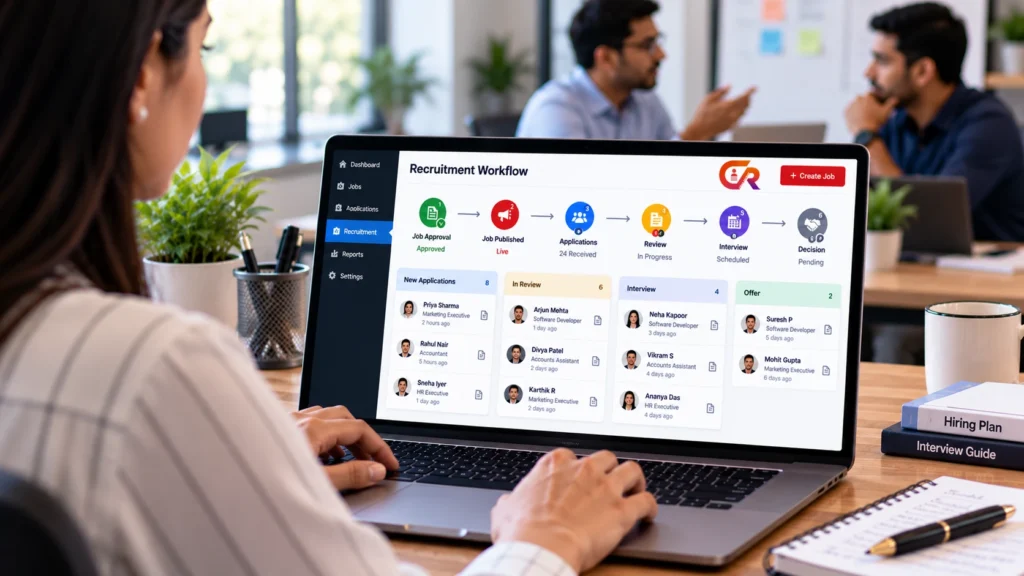
A recruitment workflow for a small business is an agreed sequence of stages, owners and decisions that takes a hiring need through to a completed hiring decision. It answers three questions for every vacancy: what happens next, who is responsible for it, and how the outcome is recorded.
Even a company that hires once or twice a year benefits from writing this down. Without it, approvals stall, applications sit in inboxes and candidates wait without hearing anything. This guide walks through a practical process you can adapt to your team size, hiring volume and approval chain. It is a model to adjust, not a rule every business must follow.
The aim of a recruitment workflow for small business teams is not bureaucracy. It is to make sure that nobody has to ask who is handling a candidate, and that the answer to any hiring question can be found in one place.
Define the Hiring Need Before Advertising
Publishing a vacancy before the requirements and approval are settled usually creates rework, because the description changes after candidates have already applied. Agree these points first:
- Why the role is needed, and whether it is new or a replacement.
- The main responsibilities and the skills the person must have.
- The approved budget and the compensation range you can discuss.
- Who makes the final decision.
- The timeline you are working towards.
A short written brief covering these points is enough. Treat the timeline as a target, not a promise to candidates.
For a replacement hire, it is worth asking whether the role should stay exactly as it was. Some vacancies are a chance to change responsibilities, and it is far easier to decide that before the vacancy is public than after applications arrive.
Assign Responsibilities
A small business rarely has a dedicated recruiting team, so one person often holds several roles. That is fine, provided ownership is clear. The typical roles are the hiring manager, a recruiter or HR coordinator, the interviewers, the final decision-maker and whoever handles candidate communication. Whatever the size of the team, a recruitment workflow only works when each stage has one named owner.
| Workflow responsibility | Typical owner | Can be combined with |
|---|---|---|
| Approve the hiring need | Owner or department head | Final decision-maker |
| Write and publish the vacancy | Hiring manager or HR coordinator | Candidate communication |
| Check new applications | HR coordinator or recruiter | Screening |
| Shortlist candidates | Hiring manager | Interviewing |
| Interview and give feedback | Interviewers | Hiring manager |
| Make and record the decision | Final decision-maker | Hiring manager |
| Inform candidates | Recruiter or HR coordinator | Vacancy closure |
Create and Publish the Job Description
A clear vacancy saves time later because candidates can judge their own fit before applying. Include an accurate job title, the responsibilities, essential and preferred qualifications, the location and work arrangement, the employment type, compensation information where appropriate, application instructions and a closing date where one applies.
Then decide where to publish. Most small businesses start with their own careers page and add relevant external job boards if the role needs wider reach. If your site runs on WordPress, our guide to adding job listings to a WordPress website explains the options, and the guide to a professional WordPress careers page covers the page that holds them.
Establish an Application Intake Process
Intake is how applications arrive and how you keep a reliable record of them. A workable intake process has an application form, a resume upload where appropriate, a clear way to tell which role each application is for, a receipt confirmation, secure storage and access limited to authorised recruiters. Candidate privacy should shape every one of those choices.
A form submission is not the same as a managed recruitment workflow. A form collects information, while a workflow decides what happens to it afterwards. If you are building the form itself, see how to create a job application form in WordPress.
Review and Screen Applications Consistently
Agree the screening criteria before you open the first application. Base them on the published requirements: required qualifications, relevant experience, role-specific skills and evidence in the application itself. Apply the same criteria to every candidate, and where appropriate note briefly why someone moved forward or was declined.
For example, if a bookkeeping role requires experience with a particular accounting package, check each application for that evidence rather than judging on the overall impression of the resume. Short, factual notes also make it easier for a second reviewer to agree or disagree with your decision.
Be cautious about automatic rejection. Unless you have a system that is suitable for the purpose and properly validated, a person should make each screening decision. Software can organise applications, but it should not be assumed to judge candidates for you.
Define the Recruitment Stages
The stages below are one practical model for a small business. Your own stages and status labels will depend on your process and your software, so treat the list as a process model rather than a set of statuses that every tool provides. A very small team may merge several stages, while a team with a formal approval chain may add some.
- Hiring need approved.
- Job published.
- Applications received.
- Applications reviewed.
- Candidates shortlisted.
- Interviews conducted.
- Decision made.
- Candidate informed.
- Vacancy closed and records handled appropriately.
| Stage | Responsible person | Expected outcome |
|---|---|---|
| Hiring need approved | Decision-maker | Written brief and budget |
| Job published | HR coordinator | Live vacancy with a closing date |
| Applications received | HR coordinator | Each application recorded against a role |
| Applications reviewed | Recruiter or hiring manager | Progress or decline decision per candidate |
| Candidates shortlisted | Hiring manager | Agreed interview list |
| Interviews conducted | Interviewers | Consistent written feedback |
| Decision made and candidate informed | Decision-maker and recruiter | Recorded outcome and candidate response |
| Vacancy closed | HR coordinator | Listing closed and records handled |
Plan Interviews and Candidate Communication
Decide the interview format, who will interview and when they are available before you invite anyone. Prepare questions tied to the job requirements, give candidates clear instructions, and collect feedback in the same format from every interviewer so decisions can be compared fairly. Treat the interview as one stage of the recruitment workflow, with a clear owner and a recorded outcome.
Be careful with timelines. Telling a candidate you will respond by a specific date is only helpful if you can keep to it. Interview scheduling tools can reduce back and forth by email, but they are an optional efficiency improvement, not a requirement for a sound process.
Make and Communicate the Hiring Decision
The decision-maker weighs the evidence gathered at each stage and records the outcome. Then tell candidates, including those who were not selected. If the decision is delayed, a short holding message is better than silence. Finally, close the vacancy so that it stops accepting applications and does not mislead anyone.
Keep the message short and respectful, and name the role the candidate applied for so there is no confusion when several vacancies are open.
Decide in advance how long candidate records will be kept and who can access them. Employment requirements and data protection rules differ by jurisdiction, so check what applies to you rather than relying on a general guide. Acas guidance on how employers should recruit says employers decide how they recruit but must follow a fair process, which is a useful check on your own recruitment workflow.
Identify Bottlenecks in the Workflow
After each hire, look at where time was lost in your recruitment workflow. These are the common problems and a practical correction for each:
| Bottleneck | Practical correction |
|---|---|
| Unclear role requirements | Write the brief before publishing |
| Slow approval | Name one approver and an expected response time |
| Too many application fields | Remove any field you do not use in screening |
| Inconsistent screening | Use the same written criteria for every candidate |
| Late interview feedback | Agree a feedback deadline with interviewers |
| Unclear ownership | Give each stage one named owner |
| Candidate details scattered across email and spreadsheets | Keep one application record per candidate |
| Vacancies left open after hiring | Make closing the vacancy a final workflow step |
Choose Tools That Match Your Recruitment Process
Your tools should fit the process, not the other way round. Email and spreadsheets cost nothing and work for very low volume. A careers page with an application form adds a public front door. A recruitment plugin stores applications against jobs inside your website, and a dedicated ATS adds deeper pipeline management.
Many small businesses start simple and add structure once volume or coordination needs grow. Signs that it is time include applications you cannot find, two people contacting the same candidate and vacancies that stay open after the role is filled.
Our explainer on what an applicant tracking system is and whether you need one helps you judge when to move, and managing job applications from the WordPress dashboard shows what day-to-day review can look like.
Where CMAA Recruit Fits
If your company already uses WordPress, CMAA Recruit can support the publishing and application parts of this workflow. The Free plugin provides job listings, an Advanced Job Builder, an application form with resume upload, an Applications list, a candidate status page and an application confirmation email. These cover the stages from job published to applications received and reviewed.
Because the form is shown on the job page and tied to that job, each application is recorded against a role, which supports the intake stage described earlier.
The Free Applications list is deliberately simple, so it does not give you shortlisting stages. According to the product page, CMAA Recruit Pro adds a Kanban pipeline, a candidates database, interview scheduling and analytics, which map more closely to the later stages above. Check the current plan details on the product page before you decide.
CMAA Recruit supports people making decisions; it does not replace them or automate every stage. You can read more in what a recruitment ATS is.
Connect job publishing with a more organized hiring workflow
See how CMAA Recruit supports recruitment through your company's WordPress website.
Frequently Asked Questions
What is a recruitment workflow?
It is the set of stages, responsibilities and decisions that moves a vacancy from an approved hiring need to a completed hiring decision, including how candidates are informed.
What are the main stages of recruitment?
Typically: approving the need, publishing the job, receiving and reviewing applications, shortlisting, interviewing, deciding, informing candidates and closing the vacancy. The exact stages depend on your business.
How can a small business organize hiring without a full HR team?
Name one owner for each stage, keep one record per application, use written screening criteria and review the process after each hire. One person can hold several roles if ownership is clear.
Does a recruitment workflow require an ATS?
No. A workflow is a process and can run on email and spreadsheets. An ATS or recruitment plugin helps when applications become difficult to track or several people need access.
How can a business keep track of candidate progress?
Record each candidate’s current stage in one place, whether that is a spreadsheet column or the status system in your recruitment software, and update it whenever the candidate moves.
How often should a recruitment workflow be reviewed?
Review it after each hiring cycle, while the problems are fresh, and update stages, owners and application fields based on what slowed you down.
Final Takeaway
A good recruitment workflow is built on five habits: define responsibilities, standardise the stages, keep a reliable application record, communicate with candidates consistently, and review the process after every hire. Start with the simplest tools that support those habits and add structure only when your hiring volume requires it.
Compare recruitment tools against your hiring workflow
Compare the available Free and Pro capabilities against your actual recruitment process.

About CMAA Softwares
CMAA Softwares builds practical software for SMEs and professional firms, grown out of problems solved first inside CMAA Advisors' own payroll, compliance, and recruitment desks. CMAA Recruit is our recruitment ATS plugin for WordPress. Learn more about us.