
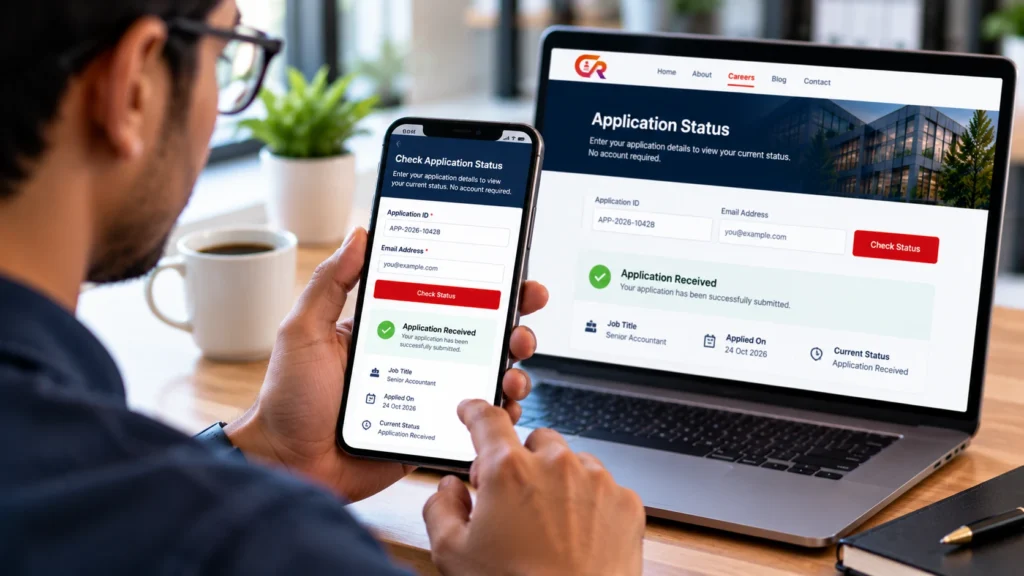
A candidate status portal can let applicants check limited information about their application without creating a full account, but only if it verifies that the person asking is entitled to see that particular application. Letting candidates check job application status without an account is a convenience feature, and it only works well when access control is designed carefully.
It helps to separate four things that are often confused: a general acknowledgement email, a candidate status lookup, a full candidate account and a recruiter-only application dashboard. This guide explains how a status portal fits among them, what to show, how to protect it and how to test it.
Why Candidates Want Application Status Updates
Anyone who has applied for a job knows the feeling of waiting. Common frustrations include:
- Uncertainty after submitting an application.
- Having to email the recruiter repeatedly for news.
- Not being sure which role an application relates to.
- Confusing receipt of an application with a decision about it.
A status portal can give candidates somewhere to look and may reduce some repetitive enquiries. It does not guarantee fewer emails or a better hiring outcome, and it works best alongside prompt, honest communication. Good job application tracking for candidates does not need a complicated system. Often it is enough to tell people, in plain words, where their application stands and what happens next. The process starts when the application arrives, which our guide to getting job applications on your website with WordPress covers.
Decide What Candidates Should Be Able to See
A candidate-facing page should show only what is useful and appropriate. A page that shows too much is a privacy risk, and a page that shows too little sends candidates back to email. Typical information includes:
- Confirmation that the application was received.
- The role applied for.
- A limited, understandable status.
- A last-updated date, where it is accurate.
- How to contact the recruitment team if needed.
Never expose recruiter-only notes, internal evaluations, other candidates’ data, confidential hiring discussions or unnecessary personal information. Remember that candidates may share devices or forward emails, so assume the page could be seen by someone other than the applicant. Internal workflow statuses may also need translating into simple messages, because a label that makes sense to a recruiter can confuse a candidate.
Choose a Status Access Method
There are four common ways to keep candidates informed:
- Status updates sent by email. Simple and familiar, but the candidate has no place to check on demand.
- A full candidate account. Flexible, but it adds registration, passwords and account management for both sides.
- A private status lookup or portal. Lets candidates check without an account, which is the approach this article focuses on to check job application status without an account.
- A recruiter answering enquiries manually. No extra software, but it takes recruiter time and does not scale.
The trade-offs are convenience, maintenance, security and complexity. A portal without accounts is convenient, but it moves the security question to how access is verified. No single design suits every product, so judge each against how it actually works. A candidate application status portal is best seen as one option among several, not a replacement for good communication. If you are weighing how much recruitment software you need at all, our article on what an applicant tracking system is and whether you need one and our guide to what a recruitment ATS is explain where status tracking fits.
Design the Candidate Lookup Carefully
The core rule is simple: the system must verify that the requester is entitled to the specific application. Design considerations include:
- Use a long, random, application-specific identifier, or another suitable verification step.
- Do not rely on sequential or guessable application numbers as the only access control.
- Keep sensitive details out of public URLs.
- Prevent one candidate from reaching another’s application.
- Limit the personal information the page displays.
- Consider rate limiting and other abuse prevention.
- Avoid revealing whether an application exists to someone who is not authorised.
- Serve the portal over HTTPS.
These are considerations, not guarantees. A particular method does not make a portal safe by itself, and a public lookup or an easily guessed link is not a safe solution. WordPress explains how to enable HTTPS, and you should verify how your own product handles each of the points above. Treat the lookup as the part of the system that most needs testing, because that is where a mistake exposes someone else’s data.
Decide Which Application Statuses to Show
Recruiters often track more detail than candidates need. People who want to check application status online usually want three answers: was my application received, is anyone looking at it and what happens next. Keep internal statuses separate from the messages candidates see. Illustrative candidate-facing messages include:
- Application received.
- Under review.
- Further discussion planned.
- Decision communicated.
These are examples only. Your actual labels depend on your recruitment workflow, and they must accurately reflect what the system holds. Do not promise real-time updates unless your setup really provides them, because a portal that updates only when someone changes a status can lag behind reality.
Build the Status Workflow in WordPress
In practical terms, the work looks like this:
- Choose a recruitment plugin or system that supports candidate status access.
- Check how applications are linked to their status records.
- Decide which statuses candidates may see.
- Configure the candidate access mechanism.
- Write clear instructions for candidates.
- Test with separate test applications.
- Confirm that unauthorised users cannot reach other records.
- Document how recruiters update the status.
Ordinary WordPress pages do not provide a secure, application-specific status portal on their own. You need functionality that ties each candidate to their own record. A job application status checker built from scratch is a security project, not a simple page, so most organisations are better served by a tool designed for the purpose. Our guide to managing job applications from the WordPress dashboard covers the recruiter side of the same workflow, and CMAA Recruit as a WordPress ATS for jobs, applications and hiring shows one implementation.
Protect Candidate Privacy
A status portal handles personal data, so keep the following in place:
- Least-privilege access for staff, using WordPress roles and capabilities where your tools support them.
- Secure, application-specific identifiers or other verification.
- HTTPS everywhere.
- No unnecessary personal information on the page.
- Careful handling of resume files.
- Retention and deletion practices.
- No public application directories.
- Monitoring of suspicious access, where supported.
- Access-control tests after plugin updates.
Think about the link itself too. Anyone who can read a candidate’s email can use a private link in it, so remind candidates not to forward it. None of this amounts to a promise of compliance with every privacy law. Your organisation remains responsible for its own policies and legal obligations.
Make Status Messages Useful and Honest
Write candidate messages in plain language, and make them truthful. Distinguish receipt from review, avoid implying a shortlist before one has happened, avoid unsupported promises about decision dates, say what a candidate should do with questions and change a label only when the underlying workflow supports it. The table is an illustrative example, not a description of any particular product’s statuses.
| Internal status (example) | Candidate-facing message (example) | What it means |
|---|---|---|
| New | Application received | The application has arrived and is waiting for review |
| In review | Under review | Someone is assessing it against the requirements |
| Shortlisted | Your application is progressing | It has moved to a further stage |
| Interview planned | Further discussion planned | The team intends to speak with the candidate |
| Decision made | Decision communicated | An outcome has been reached and shared |
| Closed | This application is closed | No further action is planned |
Keep messages short and make sure each one is true for every candidate who sees it. A recruitment status portal that overpromises damages trust faster than one that says little.
Test the Portal Before Launch
Use a staging environment or approved test records, and do not test against real candidates’ private data without authorisation. Then check that:
- The right candidate can open their own status.
- A different candidate cannot open that record.
- Guessing or changing identifiers reveals nothing about other applications.
- The page does not show resumes or internal notes.
- The portal works on mobile.
- Status messages match the real workflow.
- Invalid access attempts fail safely.
- Links and instructions work.
- Access behaviour is rechecked after configuration or plugin changes.
It also helps to ask a colleague who is unfamiliar with the project to follow a test link on a phone and tell you what they understand from the page.
Where CMAA Recruit Fits
CMAA Recruit includes a login-free candidate status page in the Free version. A candidate reaches it through a private link in the status emails they receive, and no account is needed. According to the plugin’s code, the link carries a random 48-character token, only a hash of the token is stored, the link expires after 14 days, and issuing a new link replaces the previous one. Requests are rate limited per IP address, and an unknown or expired link shows a generic message.
The page is scoped to the single application the link belongs to, and it shows the job title, the date applied and the current status.
WordPress application status pages come from plugins, not from the core software, so check how any plugin you choose handles each point in this guide.
This is different from the recruiter-only Applications list, and it is not a full candidate account system. Free does not include status controls in its Applications list, so status workflow tools belong to Pro, which also adds a Kanban pipeline, a candidates database, interview scheduling and analytics according to the product page. How much a candidate sees change over time therefore depends on the version you run and how your team uses it, and delivery of the email that carries the link depends on your site’s mail setup.
Give candidates a clearer way to follow their applications
Explore how CMAA Recruit connects application collection with candidate status access.
Frequently Asked Questions
Can candidates check application status without creating an account?
Yes, if the system provides a status page that does not require registration. A well-designed one still verifies that the person asking is entitled to see that application, for example through a private, hard-to-guess link.
Is an application status portal safe?
It can be, but safety depends on the design. It should verify the requester, show limited information, serve pages over HTTPS and be tested, especially after updates.
What information should candidates be allowed to see?
Only what they need: that the application was received, the role, a simple current status and how to get in touch. Do not show recruiter notes, evaluations or other candidates’ details.
Can candidates see real-time status updates?
Only if the system reads the current status each time the page loads and recruiters keep it up to date. A status portal is only as current as the workflow behind it.
Is an application reference number enough to protect access?
Not necessarily. Short or sequential numbers can be guessed, so a number alone is not enough protection. A long random token or an additional verification step is stronger, and any design should be tested.
Does WordPress include a candidate status portal by default?
No. WordPress core does not include one. You need a recruitment plugin or custom development. Our guide to creating a job application form in WordPress explains how applications reach your site in the first place.
Final Takeaway
To let candidates check job application status without an account, make status checking convenient, but put authorisation first: verify who is asking, show only limited information, keep status messages accurate and test access regularly. A portal that is easy to use but leaks another candidate’s details does more harm than no portal at all.
Compare candidate communication and recruitment features
Compare the Free and Pro capabilities against your recruitment process.

About CMAA Softwares
CMAA Softwares builds practical software for SMEs and professional firms, grown out of problems solved first inside CMAA Advisors' own payroll, compliance, and recruitment desks. CMAA Recruit is our recruitment ATS plugin for WordPress. Learn more about us.