
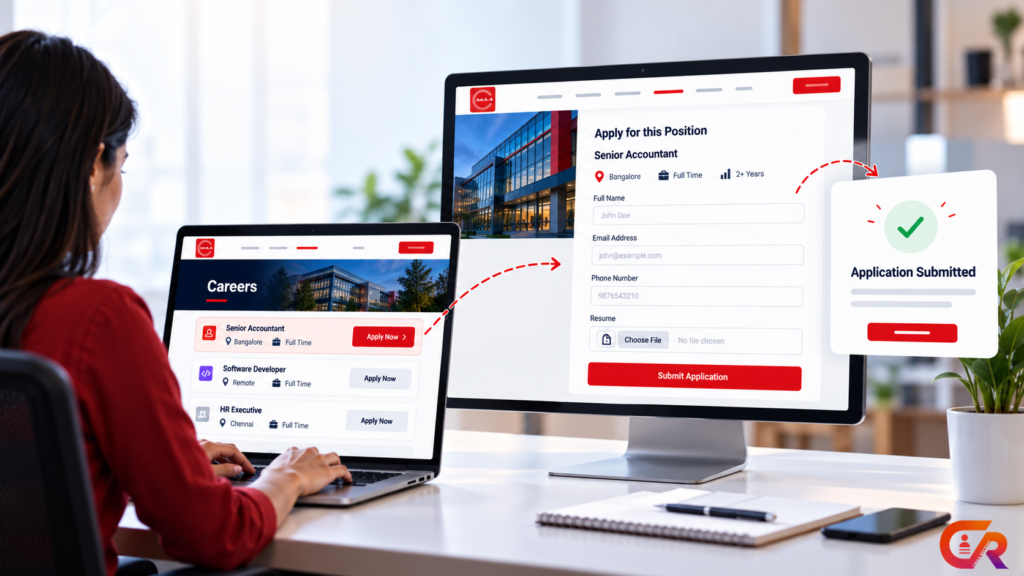
Many companies have open positions, but their website is not actually designed to generate applications. The careers page is outdated, job listings do not include enough information, and the only way to apply is emailing a generic address.
- An outdated careers page
- Jobs listed without enough information
- A generic email address as the only application method
- PDF only job descriptions
- A complicated application process
- No clear Apply button
- A poor mobile experience
A professional recruitment website should make it easy for a candidate to discover an opportunity, understand it, decide whether it fits, and apply without unnecessary friction. This guide covers how to get job applications on your website with WordPress, from discoverability through to managing what arrives.
Getting applications is only half the picture. This guide covers two connected problems: getting candidates to the application, and actually converting them into a completed application once they arrive. Managing what happens after that is a separate challenge covered later in this guide.
Why Your Company Website Should Accept Job Applications
Posting a job somewhere and owning the application experience on your own website are two different things. When applications come through your website, candidate information stays centralized instead of scattered across a job board’s dashboard, your inbox, and someone’s spreadsheet.
Owning the process also means a more consistent candidate experience and more consistent employer branding, since candidates apply on a page that looks and reads like the rest of your company website rather than a generic listing template. It gives you more control over how job information is presented, makes individual job pages available to be found in search, and makes application management easier because everything arrives in one place rather than several.
None of this means a website automatically generates applicants. It means the website removes unnecessary friction once a candidate is interested, which is a different problem from why a recruitment ATS exists in the first place. If you are still deciding whether your business needs one, see our guide to what a recruitment ATS actually does.
Create a Professional Careers Page
A careers page is where this entire process starts. At minimum it needs a clear introduction, current vacancies, departments or categories where that is useful, locations, employment types, links to individual job pages, and a clear path to apply.
If you are starting from scratch, see our guide to building a professional careers page in WordPress for the full walkthrough. The rest of this guide assumes the careers page itself already exists and focuses on what happens around it: getting the right candidates to it, and converting them into applications.
Publish Job Listings Candidates Can Actually Understand
Candidates need enough information to decide whether a role fits before they invest time applying.
Use Specific Job Titles
“We’re Hiring” tells a candidate nothing. “Senior Accountant” tells them immediately whether to look further.
Explain the Role
Describe what the person will actually do day to day, not just a generic department description reused across every listing.
State Qualifications Clearly
List what is genuinely required to do the job, separated from what is simply preferred, so candidates are not discouraged from applying by a list that mixes the two.
Include Practical Job Information
Location, work arrangement, employment type, experience level, compensation where appropriate, and benefits all reduce the uncertainty a candidate has to resolve before applying.
Make Individual Job Pages Search-Friendly
Every vacancy should have its own dedicated page rather than living as one entry in a long list. A good job page has a descriptive URL, a specific job title, complete visible job information, a clear page title, relevant content, and sensible internal links back to the careers page.
Appropriate structured data also matters here. Google’s JobPosting structured data documentation explains how this markup can help an eligible individual job page become understandable to Google. It does not guarantee search visibility or placement in Google Jobs, only that the page is described in a format Google can parse correctly.
Add a Simple Application Form
The actual application mechanism does not need to be complicated. A workable form typically asks for name, email, phone number, a resume or CV, any genuinely relevant screening information, and an acknowledgement of privacy and consent.
Every additional field is an additional reason for a candidate to abandon the form. Ask for what you actually need to evaluate the application, and leave the rest for later stages of the process, such as an interview or a follow up conversation once you already know the candidate is worth pursuing.
Make Resume Upload Easy
Resume upload is where a lot of applications quietly fail. Clearly label which file types are accepted, keep file size limits reasonable, make the upload control obvious, and confirm the submission clearly once it succeeds.
Candidate documents should also be handled with appropriate care on the storage side. This does not mean any single technical measure makes a website universally compliant with every privacy or security regulation. It means the business operating the site remains responsible for handling resumes and personal information appropriately for its own legal context.
A candidate who successfully uploads a resume but sees no confirmation is left guessing whether anything actually happened. A short confirmation message, or a confirmation email, closes that gap and reduces the chance of the same candidate submitting a duplicate application out of uncertainty.
Make the Apply Process Mobile Friendly
A large share of candidates will discover a job and consider applying from a phone. Responsive job pages, readable descriptions, a clear Apply button, mobile-friendly form fields, usable resume upload, minimal scrolling, and a clear submission confirmation all need to hold up at that screen size, not just on desktop.
A candidate who has to pinch and zoom to read a job description, or fights with a form field that was clearly designed for a mouse, is far more likely to give up partway through than to persist to the end.
Reduce the Friction Between Job Discovery and Application
The path from discovery to a completed application is short in principle: job listing, then job details, then Apply Now, then the application form, then confirmation. In practice, several points along that path commonly lose candidates.
- A difficult-to-find Apply button
- Sending the candidate to a separate website to apply
- Accepting applications by email only
- Asking for too many fields
- Requesting information the candidate already provided
- Leaving submission status unclear
- A form that breaks or behaves poorly on mobile
Removing these points one at a time tends to matter more than any single redesign. Most of them are not visible until someone actually walks through the process as a candidate would, which is worth doing on a phone as well as a desktop before assuming the application path is working correctly.
Manage Applications After They Arrive
Getting applications is only half the process. Managing them efficiently is the next challenge, and it tends to follow one of two paths.
The manual version looks like this: website, then email, then a spreadsheet, then manual tracking. The structured version looks like this: website, then application, then an application record, then candidate management, then a recruitment workflow.
A WordPress ATS can keep the entire process connected to the website candidates already applied through, rather than exporting applications into a separate system. For a closer look at how a WordPress ATS connects jobs, applications, and hiring workflows, see our guide to CMAA Recruit.
Turn your WordPress careers page into an application system
See how CMAA Recruit connects job listings, applications, and candidate management directly inside WordPress.
Optimize Your Website to Attract More Relevant Applicants
Specific job titles, search-friendly job pages, complete job information, clear location information, natural keyword usage, individual job URLs, JobPosting structured data, sensible internal linking, shareable job pages, and keeping open positions current all work together to make relevant openings easier to discover.
SEO can improve discoverability, but it does not guarantee applications or any particular number of candidates. It removes barriers between a relevant candidate and your job page. What happens after that still depends on the role, the market, and the application experience itself.
A job page that ranks well but takes too long to load, buries the Apply button, or asks for information before showing the role, still loses candidates it worked hard to attract. Discoverability and application experience need to be solved together, not treated as separate projects.
Common Reasons Your Website May Not Get Enough Applications
- Candidates cannot find your jobs.
- Job titles are too vague.
- Job descriptions do not answer basic questions.
- The Apply button is difficult to find.
- The application form is too long.
- The application process performs poorly on mobile.
- Candidates are forced to email resumes manually.
- Closed positions remain visible.
- The website gives no clear indication after submission.
- Applications arrive but there is no structured way to manage them.
How WordPress Can Power the Complete Recruitment Process
Put together, the process runs from company website, to careers page, to job listing, to individual job page, to application form, to application record, to candidate management, to recruitment workflow.
WordPress provides the website foundation for the earlier stages of that chain. Recruitment functionality, such as CMAA Recruit, is the layer that connects jobs, applications, and hiring management on top of it, so the process stays inside one website instead of moving between several disconnected tools.
Ready to manage applications directly from WordPress?
Compare CMAA Recruit's Free and Pro plans to find the right fit for your hiring volume.
Frequently Asked Questions
Can I receive job applications directly through my WordPress website?
Yes. With an appropriate application form or recruitment plugin, candidates can apply directly on your website without being sent elsewhere.
Do I need a plugin to accept job applications?
A basic form can collect applications on its own. Structured job listings, resume handling, and organized application management generally require a dedicated recruitment plugin.
How can I get more people to apply for my jobs?
Make jobs easy to find, write specific and complete job descriptions, remove unnecessary friction from the application form, and make sure the whole process works well on mobile.
Can WordPress job listings appear in Google?
Individual job pages can be eligible to appear in Google Jobs when they use correctly implemented JobPosting structured data and meet Google’s content requirements. This is not guaranteed for every listing.
Should every job have its own page?
Yes. Individual job pages are easier to search, easier to share, and allow structured data that describes one specific posting rather than a mixed list of several.
Can I manage applications inside WordPress?
Yes, with a recruitment plugin such as an ATS. Applications, candidate status, and recruiter access can all be handled from the WordPress dashboard rather than a separate system.
Final Takeaway
Getting job applications through a website is not simply about adding an application form. The process needs to connect discoverability, a careers page, complete job information, a straightforward application, and what happens to that application afterward.
WordPress can provide the website foundation for all of this, while a recruitment ATS such as CMAA Recruit can help manage what happens after applications start arriving.

About CMAA Softwares
CMAA Softwares builds practical software for SMEs and professional firms, grown out of problems solved first inside CMAA Advisors' own payroll, compliance, and recruitment desks. CMAA Recruit is our recruitment ATS plugin for WordPress. Learn more about us.