
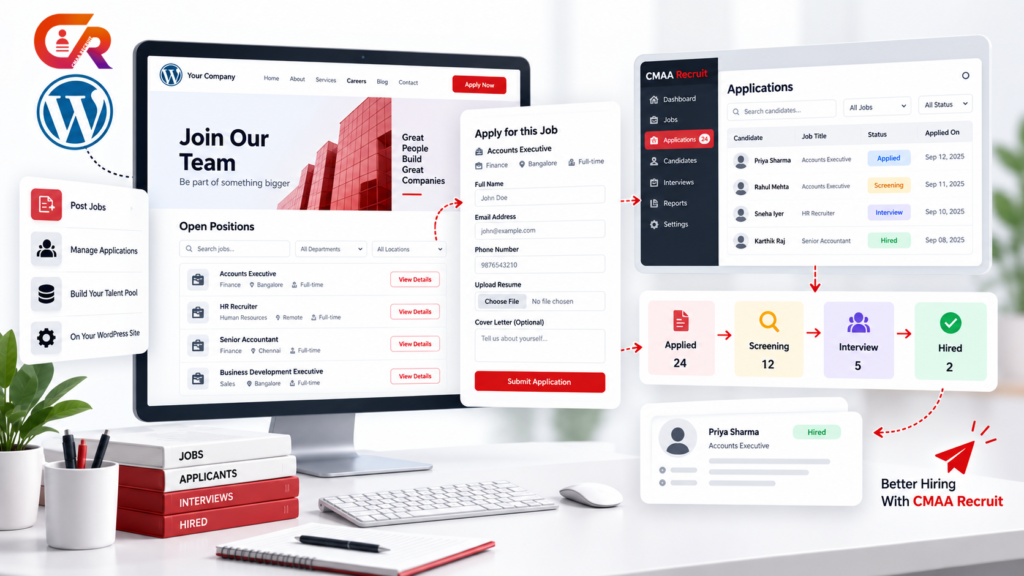
A business can already have a careers page, publish job openings, and receive applications through WordPress. The challenge starts when those applications begin arriving through different channels and the hiring team has to manage everything manually.
Recruiters may end up moving between job pages, email inboxes, spreadsheets, resumes, and separate scheduling tools just to keep track of one recruitment process. This is close to the recruitment ATS problem described in an earlier guide covering what a recruitment ATS does and why small businesses use one.
CMAA Recruit is a WordPress recruitment plugin designed to bring that workflow into the WordPress website a business already uses. It provides tools for publishing jobs, collecting applications, managing application records, and giving recruiters a structured way to handle hiring from the WordPress dashboard.
This guide explains what CMAA Recruit does, how its WordPress ATS workflow works, what is included in the Free version, what Pro adds, and when a WordPress based recruitment system can make sense.
What Is CMAA Recruit?
CMAA Recruit is a WordPress recruitment plugin and applicant tracking system that adds recruitment functionality directly to a WordPress website. Instead of connecting a careers page to a separate outside platform, the recruitment workflow runs from the same WordPress installation the business already maintains.
At a functional level, CMAA Recruit covers:
- Creating and publishing job listings
- Displaying jobs on a careers page
- Collecting applications through a frontend form
- Storing application records
- Managing recruiter access
- Candidate status functionality
- Keeping recruitment information inside WordPress
The Free version is usable on its own. It includes unlimited job listings, unlimited applications, and unlimited recruiter seats, so a business is not restricted by volume while deciding whether the plugin fits its hiring process.
Pro adds additional recruitment capabilities for teams that need more advanced candidate management and a more detailed recruitment workflow, covered later in this guide.
See CMAA Recruit in action
Try the live demo and click through the real recruitment workflow before installing anything.
How CMAA Recruit Works Inside WordPress
The recruitment workflow follows a connected sequence:
WordPress website
→
Careers page
→
Job listing
→
Application form
→
Application record
→
Candidate management
→
Recruitment workflow
A recruiter creates the job inside WordPress, and the job is published on the website’s careers page. A candidate views the job and submits an application through the frontend form. That submission becomes an application record, and recruiters manage the application from there through to a hiring decision.
For a business already using WordPress, keeping the careers experience and the recruitment workflow inside the same installation can reduce the number of separate systems recruiters need to check. This is not a claim that WordPress is a better foundation than every standalone ATS, only that it can be a practical fit for a business already built on it.
Creating and Publishing Job Listings
Jobs are created through a dedicated Job Listings post type with an Advanced Job Builder. A job entry can include the job title, department, employment type, location, experience level, compensation, job description, application instructions, SEO fields, and social sharing information.
Job pages are built with structured job information, including support for JobPosting structured data so search engines can understand and surface the listing appropriately.
Frontend listings can be added to an existing website through a shortcode, a Gutenberg block, or an Elementor widget, similar to how any other content is added using the WordPress documentation for building and managing pages. This allows job listings to fit into a careers page that already exists rather than requiring a separate site.
Building a Careers Page With WordPress
On the candidate facing side, the experience generally follows: company website, careers, open positions, an individual job, and an application form.
CMAA Recruit allows job listings to become part of an existing WordPress website rather than a separate careers microsite. A business already using WordPress can maintain its careers content alongside the rest of its website, using the same theme, navigation, and branding.
This is a practical convenience for businesses already on WordPress rather than a technical advantage over every other platform.
Managing Job Applications
Candidates apply through a frontend application form that accepts resume uploads in PDF, DOC, or DOCX format. The form includes spam protection and duplicate application detection, so the same candidate submitting twice for the same role does not create confusion in the application list.
Each submission becomes an application record, and the candidate receives an automatic confirmation email. Candidates can then check their status through a login free status page, without needing an account or a password.
Uploaded resumes are encrypted at rest. This is a technical storage safeguard, not a claim that the system is completely secure or automatically compliant with every privacy regulation. Overall privacy and legal compliance for a website remains the responsibility of the business operating it.
Managing Applications From the WordPress Dashboard
In the Free version, recruiters can view the applications list for their jobs and work through candidate status directly from the WordPress dashboard, without switching to a separate application.
Pro expands this workflow with additional capabilities, including a Kanban recruitment pipeline, a more detailed application workflow and status history, bulk actions across multiple applications, and CSV export for reporting or sharing candidate data outside WordPress. Pro also adds a full candidate database that keeps profiles available across job postings.
Free provides the core recruitment workflow. Pro adds these additional capabilities for teams that need a more structured, higher volume hiring process.
Candidate Experience and Application Status
What happens after a candidate applies matters as much as the application form itself. CMAA Recruit includes a login free candidate status portal, reached through a secure link, so candidates can check where their application stands without creating an account.
Through this portal, candidates can also replace an uploaded resume or withdraw an application if their circumstances change. This keeps candidates informed without adding manual follow up work for recruiters.
Privacy and Recruitment Data Management
A recruitment system handles personal information and resumes, so privacy controls are part of the core workflow rather than an add-on. CMAA Recruit includes an optional privacy consent step, encrypted resume storage, and support for WordPress’s built in privacy export and erase tools.
Recruiter access can be scoped so recruiters only see candidate information relevant to the jobs they manage, rather than every application across the business.
None of these features automatically make a website compliant with every privacy regulation. The plugin provides the technical tools, but the business operating the website remains responsible for its own privacy notices, policies, retention practices, and legal compliance.
CMAA Recruit Free vs Pro
Free includes the core recruitment workflow:
- Unlimited job listings
- Unlimited applications
- Unlimited recruiter seats
- Job publishing
- Application collection
- Application management
- Candidate status functionality
- Gutenberg support
- Elementor support
Pro adds advanced capabilities on top of that workflow:
- Screening questions
- Automatic resume to job matching
- Kanban recruitment pipeline
- Candidate database
- Employee referrals
- Analytics
- Audit logging
- EEO and diversity reporting
- Interview scheduling
- Google Meet integration
- Job board feeds
- Outbound webhooks
Free is not a limited trial. It is a usable recruitment system on its own, with no caps on listings, applications, or recruiter seats. Pro is for teams that need the additional workflow, reporting, and integration capabilities listed above.
Compare CMAA Recruit Free and Pro
See the full feature breakdown and pricing to decide which fits your hiring volume.
Who Is CMAA Recruit Designed For?
Small businesses
Businesses that need structured application management without necessarily requiring a large enterprise ATS.
Growing companies
Companies whose application volume is increasing and who need more structured candidate management than a shared inbox can support.
Internal recruitment teams
Teams managing their own careers website and recruitment process, rather than outsourcing hiring entirely.
WordPress based organizations
Businesses that already rely on WordPress and want recruitment functionality inside the existing website environment rather than a separate platform.
CMAA Recruit is not necessarily suitable for every company, particularly those with recruitment needs that fall outside a standard WordPress based workflow.
When Does a WordPress ATS Make Sense?
A WordPress based recruitment system tends to make sense when a business already has a WordPress website, already runs its careers page on WordPress, and is currently managing applications through email or spreadsheets. It also fits when there is a clear need for a central application list, a way to manage candidate status, and a preference for keeping careers content and recruitment inside one website.
Starting with a usable Free recruitment system and expanding to Pro later, if the hiring process grows, is one practical way to adopt this approach without a large upfront commitment.
Another architecture may be more appropriate in other circumstances. Larger recruitment operations with highly specialized enterprise HR or ATS requirements may need a dedicated enterprise recruitment platform built specifically for that scale.
Frequently Asked Questions
Is CMAA Recruit a WordPress ATS?
Yes. CMAA Recruit is an applicant tracking system built as a WordPress plugin, running job publishing, applications, and candidate management from the WordPress dashboard.
Is CMAA Recruit free?
The Free version is a usable recruitment system on its own, with unlimited job listings, applications, and recruiter seats. Pro is a paid upgrade that adds further recruitment workflow and reporting capabilities.
Can candidates apply directly through my WordPress website?
Yes. Candidates apply through a frontend application form on the website, with resume upload support, without leaving the site or visiting a separate platform.
Does CMAA Recruit work with Elementor?
Yes. Job listings can be added to a page using an Elementor widget, a Gutenberg block, or a shortcode, depending on how the site is built.
Can recruiters manage applications from WordPress?
Yes. Recruiters review applications and manage candidate status from the WordPress dashboard, with access scoped to the jobs they are responsible for.
Does CMAA Recruit support JobPosting structured data?
Yes. Job listings include structured job data. Individual job pages should still be reviewed against Google’s JobPosting structured data documentation to confirm the markup matches current requirements.
Does CMAA Recruit require coding?
No. Jobs, applications, and candidate management are handled through the standard WordPress dashboard and frontend blocks, without custom development.
Can I start with Free and move to Pro later?
Yes. A business can start with the Free version and upgrade to Pro later if its recruitment volume or workflow requirements grow.
Final Takeaway
CMAA Recruit adds recruitment functionality to an existing WordPress website rather than replacing it with a separate system.
It allows a business to publish jobs, collect applications, manage application records, provide candidate status functionality, and keep recruitment information inside WordPress.
The Free version provides the core recruitment workflow on its own. Pro adds advanced candidate management, a Kanban recruitment pipeline, reporting, integrations, and additional workflow capabilities for teams that need them.
For a business already running on WordPress and looking to bring its hiring process into one place, CMAA Recruit is one option worth evaluating.

About CMAA Softwares
CMAA Softwares builds practical software for SMEs and professional firms, grown out of problems solved first inside CMAA Advisors' own payroll, compliance, and recruitment desks. CMAA Recruit is our recruitment ATS plugin for WordPress. Learn more about us.