Recruiting can become difficult to manage long before a business considers itself a large employer.
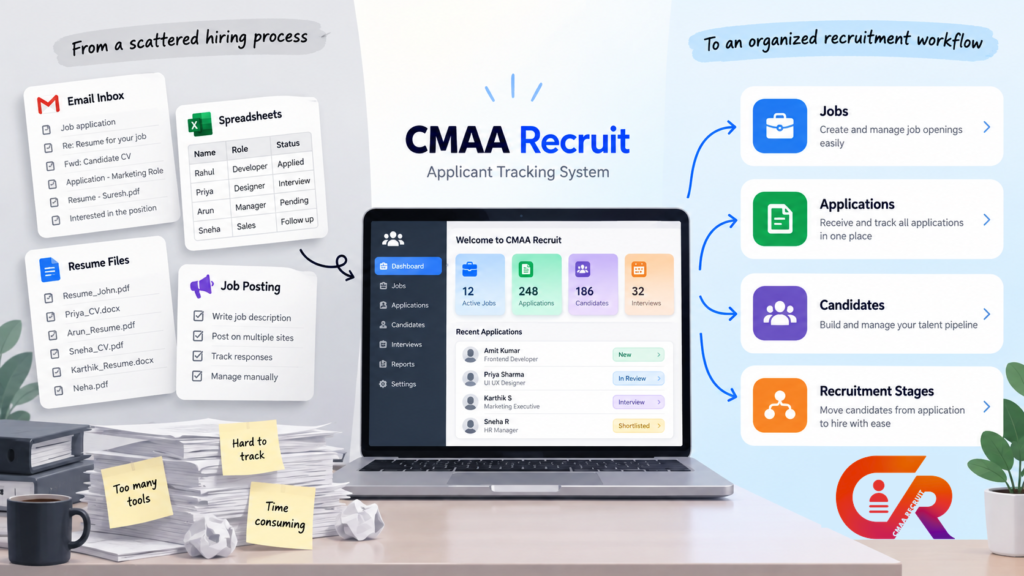
A few applications may be easy to manage through email, spreadsheets, folders, and a careers page. As volume grows, it becomes harder to track candidates, find resumes, and follow up.
This is where a recruitment ATS can help.
A recruitment ATS, or applicant tracking system, is software that helps a business manage job openings, collect applications, organize candidate information, track recruitment stages, and coordinate the hiring process.
An ATS does not have to mean complex enterprise software. For a small business, it can simply provide a more organized way to manage hiring without maintaining multiple spreadsheets, inboxes, and folders.
This guide explains what a recruitment ATS does, when a small business may need one, what to look for, and how an ATS can fit into a WordPress careers website.
What a Recruitment ATS Actually Does
A recruitment ATS brings the main parts of the hiring process into a structured workflow.
Instead of treating every application as a separate email or file, the system connects job openings, applications, candidates, and recruitment stages.
A typical ATS can help with four core areas:
- Managing job openings and their details
- Collecting applications through a structured process
- Organizing candidate information and documents
- Tracking candidates through recruitment stages
Some systems also support communication, interviews, reporting, recruiter permissions, and other activities.
Why Businesses Outgrow Spreadsheets and Inboxes
Spreadsheets and email can work well when hiring activity is small.
The problem appears when recruitment becomes more frequent or involves several people.
Applications can become buried in inboxes. Resumes may be stored in different folders. Multiple people may maintain different versions of a spreadsheet.
Common problems include:
- Difficult to find applications
- Duplicate records
- Missed follow ups
- Unclear candidate stages
- Resumes stored in different locations
- Limited visibility across open positions
- Manual status tracking
An ATS provides a structured place to manage this information.
The goal is to make the recruitment process easier to organize and easier for the hiring team to understand.
Does a Small Business Need an ATS?
Company size alone does not determine whether an ATS is useful.
A small business hiring regularly may benefit more from recruitment software than a larger business that hires only occasionally.
Consider:
- Number of open positions
- Number of applications
- Number of people involved in hiring
- Frequency of recruitment
- Number of recruitment stages
- Time spent organizing applications
- Need to retain candidate information
A simple workflow may be enough when hiring is occasional, application volume is low, and one person manages recruitment.
An ATS becomes more useful when application volume grows, several positions are active, multiple people participate in hiring, or manual tracking consumes significant administrative time.
The goal is to use software that matches the company’s actual hiring process.
What to Look for in a Recruitment ATS
Start with the workflow rather than a long feature list.
A Clear Application Workflow
Candidates should have a straightforward way to apply, while recruiters should have a straightforward way to review applications.
Easy Job Management
Recruiters should be able to create and maintain job openings without unnecessary technical work.
Candidate Organization
The system should make candidate information easy to find and understand, particularly when several positions are active.
Appropriate Access Controls
Recruitment information should only be accessible to people who need it. Evaluate the roles and permissions available to recruiters and administrators.
Resume and Document Handling
Understand how resumes and other candidate documents are stored, accessed, protected, and managed.
Privacy and Data Protection
Recruitment systems handle personal information. Review storage, access, retention, deletion, and other privacy controls before choosing a platform.
Website Integration
If your business already has a careers page, consider whether the ATS works with your existing website or requires candidates to move to a separate platform.
Pricing That Matches Your Needs
Compare pricing with your actual hiring volume and requirements. More features or a higher price do not automatically mean a better fit.
Cloud ATS vs. WordPress Based Recruitment Software
A cloud ATS and WordPress based recruitment software can both support recruitment, but they approach the process differently.
A cloud ATS typically operates as a separate recruitment platform. The company manages recruitment in that system and may connect its website or careers page to it.
WordPress based recruitment software operates within an existing WordPress website, as described in the WordPress documentation. This can allow the careers experience and recruitment administration to work within the same website environment.
For a business already using WordPress, this approach can provide practical advantages:
- Jobs can be managed alongside the existing website
- The careers experience remains part of the company website
- Recruitment does not necessarily require a separate public platform
- Administrators can work within the familiar WordPress environment
The right choice depends on the company’s hiring process, website, budget, technical requirements, and expected growth.
How a Recruitment ATS Fits Into a WordPress Careers Site
For a business using WordPress, recruitment can follow a connected workflow:
WordPress website
→
Careers page
→
Job listing
→
Application form
→
Application record
→
Candidate management
→
Recruitment workflow
The public website provides the candidate experience.
The recruitment system manages the information created when candidates apply.
For example, a business can publish a job on its WordPress careers page, allow candidates to apply through the same website, and then manage those applications from the WordPress administration environment.
CMAA Recruit is an example of a WordPress based recruitment ATS designed around this approach.
It provides job management, application collection, recruiter access controls, candidate status functionality, privacy related controls, and other recruitment workflow capabilities within WordPress.
If your website publishes individual job pages, it is also worth understanding Google’s requirements for JobPosting structured data and how that markup should correspond to the job page.
The important question is not simply whether recruitment software runs on WordPress. It is whether the system supports the company’s actual hiring workflow while providing an appropriate experience for candidates and recruiters.
Want to See How Recruitment Can Work Inside WordPress?
See the CMAA Recruit demo and try the workflow shown above.
Common Mistakes When Choosing Recruitment Software
Choosing Based Only on Features
A large feature list does not automatically make software better for a small business. Evaluate capabilities that directly support your hiring process.
Ignoring the Actual Hiring Workflow
Map how your business creates jobs, receives applications, reviews candidates, conducts interviews, and makes decisions before choosing software.
Overlooking Candidate Privacy
Understand how candidate information and documents are stored, accessed, protected, retained, and deleted.
Forgetting About Recruiter Access
If multiple people participate in hiring, make sure the system provides appropriate roles and permissions.
Paying for Complexity You Do Not Need
Choose software based on your actual requirements rather than assuming enterprise functionality is necessary.
When a Simple Hiring Workflow Is Enough
Not every business needs a recruitment ATS.
If a company hires only a few people each year, receives very few applications, and has one person managing recruitment, email and spreadsheets may be sufficient.
The decision changes when recruiters regularly spend time searching emails, updating spreadsheets, locating resumes, checking application status, or asking colleagues for information that should already be available.
The purpose of an ATS is not to introduce technology for its own sake. It is to make recruitment more organized, consistent, and manageable when a manual process starts creating unnecessary work.
Frequently Asked Questions
What Does ATS Stand for in Recruitment?
ATS stands for Applicant Tracking System. It is software used to organize and manage recruitment activities such as job openings, applications, candidate information, and recruitment stages.
What Is a Recruitment ATS?
A recruitment ATS is an applicant tracking system that helps businesses manage their recruitment process through a structured workflow.
Is an ATS Useful for Small Businesses?
It can be. An ATS becomes particularly useful when application volume grows, several people participate in hiring, multiple positions are active, or manual tracking takes significant time.
Can an ATS Be Used With WordPress?
Yes. Some systems operate directly within WordPress, while others connect a WordPress careers website with an external recruitment platform.
Can an ATS Replace a Job Board?
No. A job board helps advertise vacancies, while an ATS helps organize and manage applications and the recruitment process.
Does an ATS Store Resumes and Candidate Information?
Many ATS platforms store candidate information and documents. Businesses should evaluate storage, security, access, privacy, retention, and deletion controls before choosing a system.
Final Takeaway
A recruitment ATS is fundamentally a tool for organizing the hiring process.
It brings job openings, applications, candidate information, recruitment stages, and recruiter activity into a structured workflow instead of scattered inboxes, spreadsheets, and folders.
Small businesses do not necessarily need the most advanced recruitment platform available.
They need a system that fits the way they hire.
For some businesses, a simple manual process remains sufficient. For others, growing application volume, multiple open positions, or rising administrative work can make an ATS a practical next step.
If your business already uses WordPress for its website and careers page, a WordPress based recruitment ATS is one option worth evaluating.
Ready to Explore a WordPress Based Recruitment ATS?
Compare CMAA Recruit's free and paid plans to find the right fit.

About CMAA Softwares
CMAA Softwares builds practical software for SMEs and professional firms, grown out of problems solved first inside CMAA Advisors' own payroll, compliance, and recruitment desks. CMAA Recruit is our recruitment ATS plugin for WordPress. Learn more about us.